Many organizations do not begin with bad processes. They begin with tools that are familiar and inexpensive: a paper sign-in sheet, an Excel workbook, and a staff member who knows how all the pieces fit together. The problem appears when participation grows and the same information has to be copied, checked, totaled, and prepared for reporting again and again.
That was the workflow Gaitway wanted to improve. Participant program hours were recorded on paper and in spreadsheets, then staff had to calculate totals manually. Domi Websites designed and developed a custom operations platform that connects attendance, scheduling, hour calculations, and printable reports.
The operational problem behind the spreadsheet
A spreadsheet can calculate totals, but it cannot automatically capture what happened at the front desk. A paper sheet can record an arrival, but it does not update the schedule or prepare a report. Staff become the connection between those separate tools.
In a manual workflow, one attendance record may be written down, entered again, checked for mistakes, matched to a participant, and included in a later calculation. Every handoff takes time and creates another opportunity for an incomplete or inconsistent record.
The goal was not simply to recreate the spreadsheet on a screen. The useful solution had to follow the complete path of the information: capture attendance when it happens, connect it to the right participant and program, calculate the duration, and make the result easy for staff to review and print.
Start with a focused participant kiosk
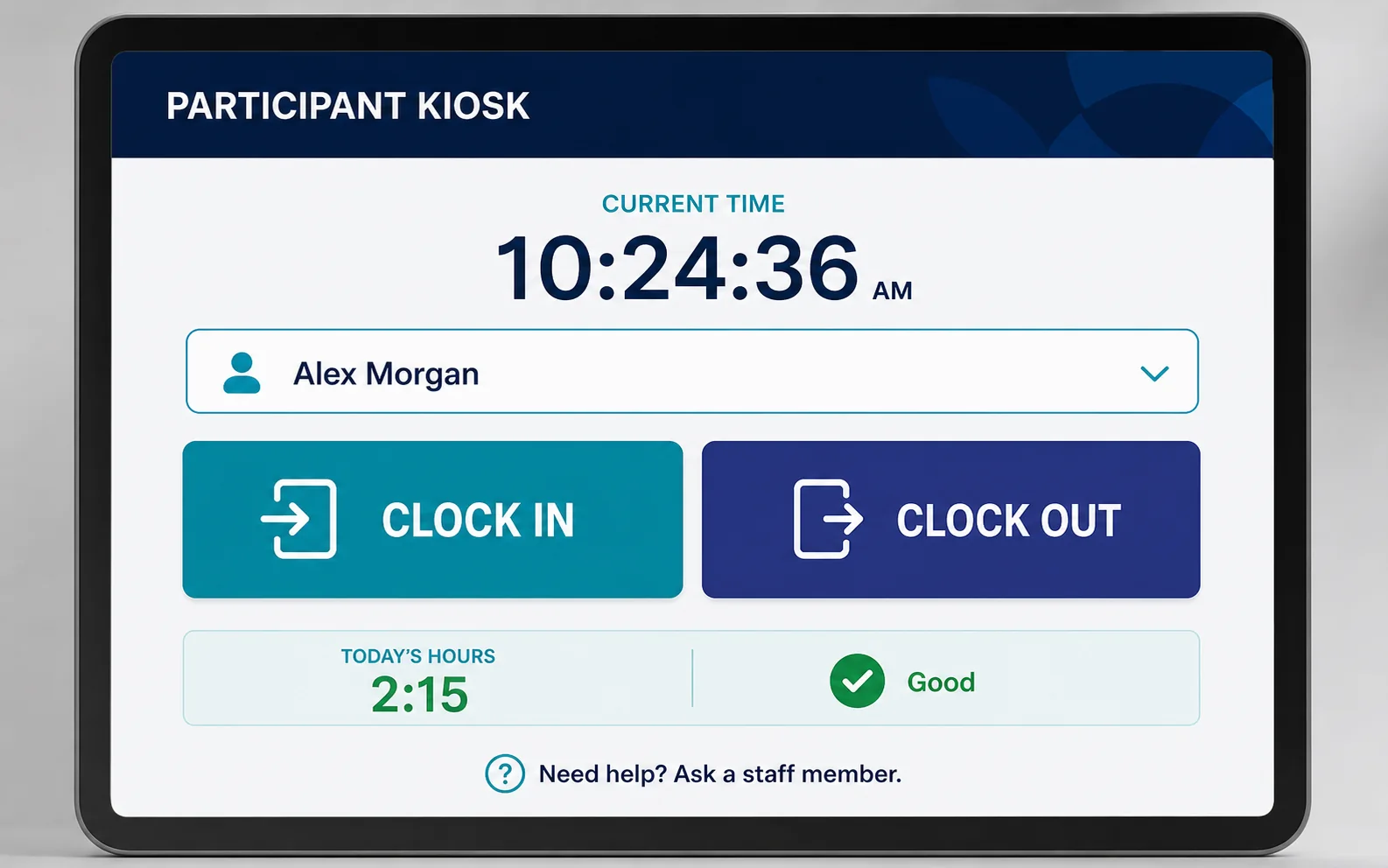
The kiosk gives participants a straightforward place to clock in and clock out. The screen is designed around a small number of clear actions instead of exposing the full administrative system.
This changes where the digital record begins. Staff no longer need to treat a handwritten sheet as the original source and transfer every entry later. The recorded event can enter the system at the moment it happens, with a consistent structure that the rest of the workflow can use.
A good kiosk also has to work in the real environment. Buttons should be easy to identify, the current status should be clear, and the interface should help prevent accidental duplicate actions. Accessibility and simplicity matter more here than fitting many features onto one screen.
Connect attendance with scheduling
Attendance data is more useful when staff can understand it in context. The platform includes scheduling tools so the team can organize participant and staff activity without relying on a separate workbook for the weekly plan.
A shared schedule gives authorized staff one place to see what is planned and make updates. It also creates a clearer relationship between the expected session and the clock-in or clock-out record. The system is designed to support a growing team of more than 10 staff members and more than 50 participants without adding another layer of manual coordination.
Calculate program hours automatically
Once a valid clock-in and clock-out pair exists, software can calculate the duration consistently. That removes a repetitive step from the staff workflow and reduces dependence on spreadsheet formulas or manual arithmetic.
Automation does not mean hiding the result. Staff still need a way to review records, identify exceptions, and confirm that a report represents the correct date range and participants. The system handles the routine calculation while keeping the information understandable to the people responsible for it.
Turn records into printable reports
The platform can organize participant hours into reports that staff can review and print. Instead of rebuilding totals each time a report is needed, the team can choose the appropriate records and generate a consistent output from the information already stored in the system.
Print support matters because digital transformation does not always eliminate paper from every downstream process. A practical system should meet the organization where it is today while creating a cleaner source of data for future needs.
Why custom software was appropriate
Off-the-shelf attendance products can work well when the organization can adapt to their terminology, roles, and reports. A custom system becomes valuable when the workflow has a specific combination of participants, program hours, staff scheduling, kiosk use, and reporting requirements.
The advantage is not customization for its own sake. It is the ability to remove steps that exist only because several general-purpose tools do not communicate with one another. The best custom software should feel smaller and clearer than the manual process it replaces.
What organizations can learn from this workflow
- Map the entire information path before selecting software.
- Capture data as close as possible to the moment it is created.
- Automate repeatable calculations but preserve staff review.
- Design each interface for the person using it, not for every possible feature.
- Choose tools that can grow with the team and participant base.
From scattered records to one operational system
The core improvement is the connection between steps. A participant clocks in through the kiosk, the system records the event, the schedule gives staff context, hours are calculated, and the information can become a printable report. One record moves through the workflow instead of being recreated across paper and Excel.
Explore the Gaitway platform case study or learn how Domi Websites approaches custom business software for small organizations.